> For the complete documentation index, see [llms.txt](https://docs.datasentinel.io/manual/llms.txt). Markdown versions of documentation pages are available by appending `.md` to page URLs; this page is available as [Markdown](https://docs.datasentinel.io/manual/ai-connector/readme.md).

# AI Connector

<figure><img src="https://196776047-files.gitbook.io/~/files/v0/b/gitbook-x-prod.appspot.com/o/spaces%2FDL4xMeOs1Z7fz2LBCNSv%2Fuploads%2Fgit-blob-421af5eb4c3e4fdb3ed2d826407cb5eb76731678%2Fai-connector-overview.svg?alt=media" alt="An AI assistant asks a question in plain language; the request goes through AI Connector (MCP server and Skill) to the Datasentinel platform, which reads PostgreSQL metrics; findings ordered by impact and a recommendation come back."><figcaption></figcaption></figure>

**AI Connector** opens Datasentinel metrics to AI assistants. Ask a question in plain language: the assistant analyzes your PostgreSQL workload, explains what it finds, and turns the evidence into concrete recommendations.

{% hint style="success" %}
AI Connector ships with Datasentinel **2026.10**, available on **November 2, 2026**. Until then, you can try it end to end on the [sandbox platform](/manual/ai-connector/test-with-the-sandbox-platform.md), with no installation.
{% endhint %}

It unlocks new ways of working with Datasentinel:

* Natural-language conversations
* Actionable recommendations, grounded in your own metrics
* Recurring analyses
* Dynamic dashboards
* And more...

{% hint style="info" %}
It brings that analysis within reach of application teams as easily as DBAs.
{% endhint %}

{% tabs %}
{% tab title="What it enables" icon="sparkles" %}

* **New usage modes:** natural-language conversations over your metrics, dynamic dashboards, recurring automated analyses, and more.
* **Performance analysis in the past:** investigate historical workload (the same data behind [Session History](https://app.gitbook.com/o/DaDQkGCM7r2TghFSBFLQ/s/yE16Xb3IemPxJWydtPOj/features/key-features/session-history) and [Top Queries](https://app.gitbook.com/o/DaDQkGCM7r2TghFSBFLQ/s/yE16Xb3IemPxJWydtPOj/features/key-features/top-queries)) on a single instance or on a set of instances selected by [tag (TAG)](https://app.gitbook.com/o/DaDQkGCM7r2TghFSBFLQ/s/yE16Xb3IemPxJWydtPOj/features/tips-and-hints/tags), with optional generation of [reports](https://app.gitbook.com/o/DaDQkGCM7r2TghFSBFLQ/s/yE16Xb3IemPxJWydtPOj/features/key-features/reporting) in HTML or other formats.
* **Real-time troubleshooting:** diagnose a live PostgreSQL instance in real time through the [Live360](https://app.gitbook.com/o/DaDQkGCM7r2TghFSBFLQ/s/yE16Xb3IemPxJWydtPOj/features/key-features/live360) module, subject to the user's rights on it.
* **Workload comparison:** compare different workloads (across time periods, instances, or applications) to highlight differences, trends, and regressions.
* **Actionable recommendations:** because the assistant reasons over the full database context exposed by Datasentinel, it naturally turns its analyses into concrete recommendations: queries to optimize via [Top Queries](https://app.gitbook.com/o/DaDQkGCM7r2TghFSBFLQ/s/yE16Xb3IemPxJWydtPOj/features/key-features/top-queries), indexes and [execution plans](https://app.gitbook.com/o/DaDQkGCM7r2TghFSBFLQ/s/yE16Xb3IemPxJWydtPOj/features/other-features/execution-plans) to consider, [parameters to review](https://app.gitbook.com/o/DaDQkGCM7r2TghFSBFLQ/s/yE16Xb3IemPxJWydtPOj/features/other-features/changed-parameters), regressions to investigate, vacuum/autovacuum tuning, and object reorganization when fragmentation or bloat builds up.
* **Reaching application teams:** beyond DBAs, the connector makes Datasentinel accessible to application teams far more easily than a purely technical monitoring tool, by adapting its communication and level of detail to each audience's profile.

{% hint style="info" %}
This list is not exhaustive: because the assistant works from your live metrics, many other usage modes are possible.<br>

A few examples: scheduled health checks and daily or weekly digests, alert triage with root-cause explanations, before/after reviews of a deployment or parameter change, index and schema advisory sessions, anomaly explanation in plain language, executive summaries for non-technical stakeholders.

New usage modes keep emerging as teams find their own ways to query their data.
{% endhint %}
{% endtab %}

{% tab title="How it works" icon="gears" %}
AI Connector is made of two parts:

* **An MCP server**, running on each platform server. It exposes Datasentinel's metrics to AI assistants over the [Model Context Protocol (MCP)](https://modelcontextprotocol.io/).
* **A** [**Skill**](https://agentskills.io/), which tells the AI assistant how to use the MCP server: which tools to call, in what order, and how to turn the results into analyses and recommendations.

You can run several MCP servers, one per platform server, so the number of MCP servers scales with the number of platforms you operate. An assistant can register several of them at once, letting you switch platforms mid-conversation or get an overview across all your Datasentinel platforms. See [Work with several platforms](/manual/ai-connector/analyze-and-tune-workloads/work-with-several-platforms.md).

The MCP servers and the Skill must both be configured in the assistant before it can dialog with your platform(s). Once configured, the assistant connects to the MCP server(s) and follows the Skill to drive Datasentinel.

Any assistant that supports MCP and Skills can be used, whether it runs as a desktop app, a CLI, or an IDE extension. Popular examples include [Claude](https://claude.com/), [Codex](https://openai.com/codex/), [Copilot](https://github.com/features/copilot), [Deep Agents](https://www.langchain.com/deep-agents), and [Hermes Agents](https://hermes-agent.nousresearch.com/).

The LLM behind each assistant is entirely independent of AI Connector: you choose your assistant and its model, and AI Connector works with whichever one you use.

{% hint style="info" %}
Beyond ready-made assistants, you can also develop your own programs that access the AI Connector directly, for fully custom integrations and automation. See [Build a Python agent with deepagents](/manual/ai-connector/developers/build-a-python-agent-with-deepagents.md) for a worked example.
{% endhint %}
{% endtab %}
{% endtabs %}

## Get started

{% stepper %}
{% step %}

#### Get a platform with the MCP server

Use the [sandbox platform](/manual/ai-connector/test-with-the-sandbox-platform.md), or upgrade your own platform to 2026.10 or later: the MCP server is bundled with it. On an upgrade from an older release, follow the [manual setup](/manual/ai-connector/server-setup/mcp-server-setup.md#manual-setup-on-upgrade).
{% endstep %}

{% step %}

#### Connect your assistant

Register the MCP server URL, `https://<host name>/mcp`, under a name that starts with `datasentinel-`, so the Skill discovers it. Then install the Skill from [`datasentinel-skill.zip`](https://app.datasentinel.io/ds-api/download/datasentinel-skill.zip). Each guide under [Configure an assistant](#configure-an-assistant) walks through both for one assistant.
{% endstep %}

{% step %}

#### Sign in and ask

Your first question opens the Datasentinel login page in your browser: sign in with your platform login. Then ask, for example, *"which instances do I have?"*. Real-time analyses also need the [Live360](https://app.gitbook.com/o/DaDQkGCM7r2TghFSBFLQ/s/yE16Xb3IemPxJWydtPOj/features/key-features/live360) right on your account.
{% endstep %}
{% endstepper %}

## Get the most precise recommendations

The precision of the assistant's analyses depends directly on the depth of the metrics Datasentinel collects. Two setup points raise that depth significantly:

{% hint style="warning" %}

* **If you collect metrics with local** [**agents**](https://app.gitbook.com/o/DaDQkGCM7r2TghFSBFLQ/s/yE16Xb3IemPxJWydtPOj/getting-started/installation/agent)**, upgrade them to version 4.0.0 or later.**
* **Install the bundled analytics function.** It enriches metric collection and lets the AI assistant deliver more precise recommendations.
  {% endhint %}

## Security

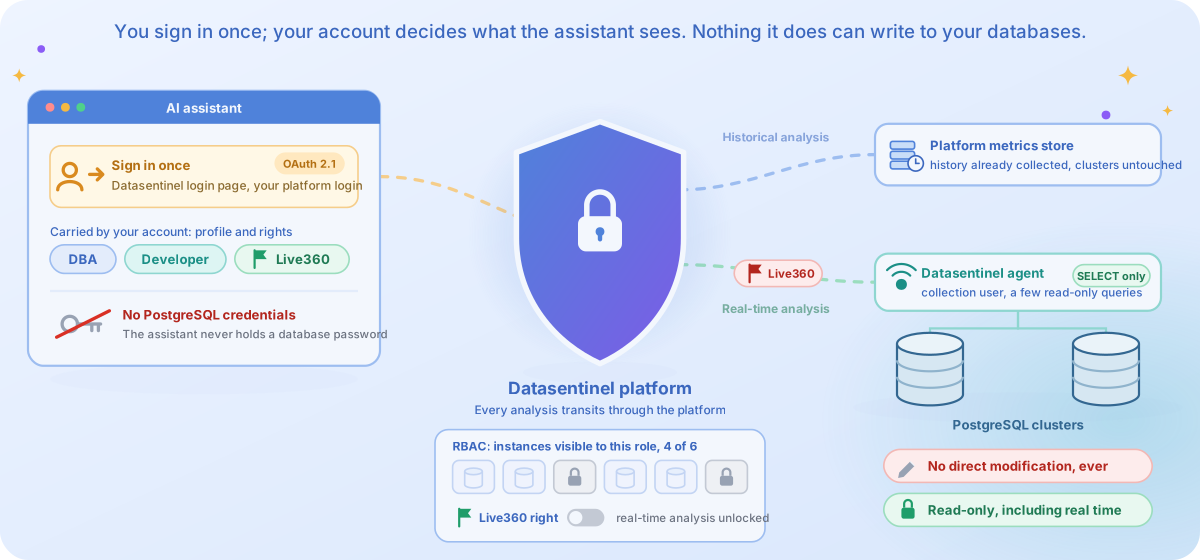
<figure><img src="https://196776047-files.gitbook.io/~/files/v0/b/gitbook-x-prod.appspot.com/o/spaces%2FDL4xMeOs1Z7fz2LBCNSv%2Fuploads%2Fgit-blob-974186a89aac7a2e3a3a9afd392714c9306fe9aa%2Fai-connector-security.svg?alt=media" alt="The assistant holds only a token obtained by signing in on the Datasentinel login page, never a database password. The token unlocks the Datasentinel platform, which shows only the instances the user&#x27;s role allows. Historical analyses are answered from the metrics the platform already collected. Real-time analyses need the Live360 right on the account, and only then does the platform ask the Datasentinel agent to run a few read-only queries on the PostgreSQL clusters. No direct modification ever happens."><figcaption></figcaption></figure>

Opening your metrics to an AI assistant never opens your databases. Every analysis stays read-only, and each user sees only what their platform rights allow.

#### <i class="fa-user-lock" style="color:$primary;">:user-lock:</i> Access control

Access is granted by **signing in**. The first time an assistant uses the Datasentinel MCP server, it opens the Datasentinel login page in your browser and you sign in with your platform login and password, the same ones as the web interface. The assistant then holds a token on your behalf, renews it silently, and never asks you for a token or a password in the conversation. You sign in again only after ten days without using the server. That token is your own: it carries your account, so it:

* restricts which instances can be reached ([RBAC](https://app.gitbook.com/o/DaDQkGCM7r2TghFSBFLQ/s/yE16Xb3IemPxJWydtPOj/features/other-features/role-based-access));
* applies per-profile permissions (DBA or Developer), as configured under [Users & Roles](https://app.gitbook.com/o/DaDQkGCM7r2TghFSBFLQ/s/yE16Xb3IemPxJWydtPOj/implementation/platform-usage/configuration/users-and-roles);
* determines real-time access through the [Live360](https://app.gitbook.com/o/DaDQkGCM7r2TghFSBFLQ/s/yE16Xb3IemPxJWydtPOj/features/key-features/live360) module: a user without this privilege cannot trigger any real-time analysis.

Scripts and scheduled jobs, which have nobody to sign in, use a [user token](https://app.gitbook.com/o/DaDQkGCM7r2TghFSBFLQ/s/yE16Xb3IemPxJWydtPOj/implementation/platform-usage/api-reference/access-token) instead: obtained from the web interface or the API, valid 24 hours, and sent by the client as an authorization header.

#### <i class="fa-shield-check" style="color:$primary;">:shield-check:</i> Read-only by design

Every analysis, including real-time ones, transits through the platform.

* Real-time analyses run only a few **read-only** queries via the Datasentinel [agent](https://app.gitbook.com/o/DaDQkGCM7r2TghFSBFLQ/s/yE16Xb3IemPxJWydtPOj/getting-started/installation/agent) and the Datasentinel [collection user](https://app.gitbook.com/o/DaDQkGCM7r2TghFSBFLQ/s/yE16Xb3IemPxJWydtPOj/getting-started/postgresql-clusters/monitoring-user).
* No direct modification is ever made on the PostgreSQL clusters.
* No PostgreSQL credential is ever known to the AI assistants.

## Communication style

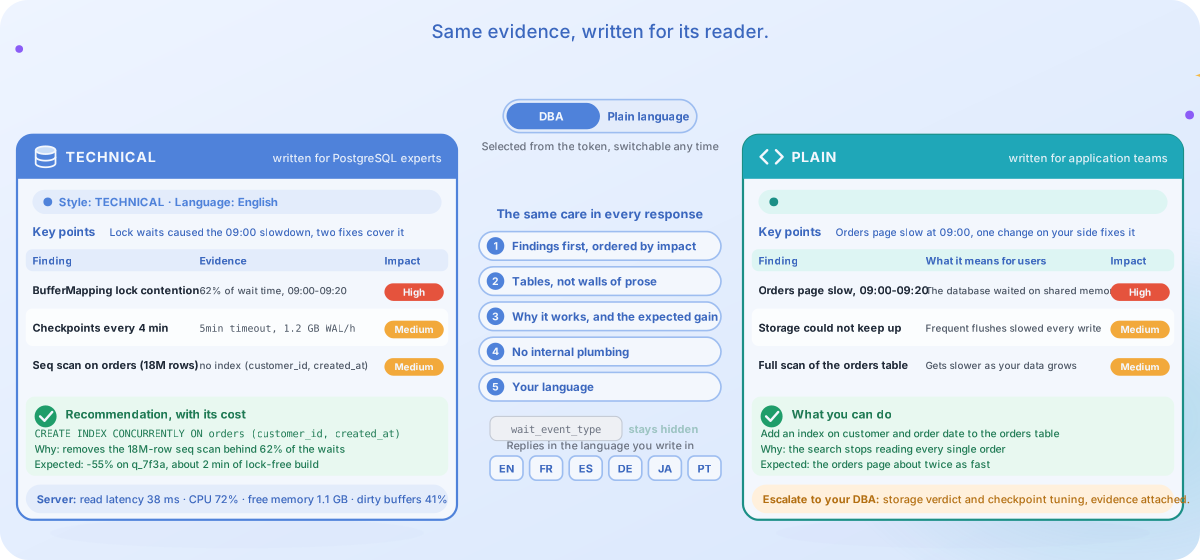
<figure><img src="https://196776047-files.gitbook.io/~/files/v0/b/gitbook-x-prod.appspot.com/o/spaces%2FDL4xMeOs1Z7fz2LBCNSv%2Fuploads%2Fgit-blob-85ba1747ed0813bdb6ec584b58733158abdf974e%2Fai-connector-communication-style.svg?alt=media" alt="The same findings rendered twice: in the TECHNICAL style, in PostgreSQL vocabulary with full measurements and the operation with its cost, and in the PLAIN style, in plain language, focused on user impact, with the actions the reader owns and an escalation for the rest. A style switch flips between the two, and five shared rules light up in turn: findings first by impact, tables not prose, every recommendation with its why and expected gain, no internal plumbing, and replies in your language."><figcaption></figcaption></figure>

The Skill does more than tell the assistant which tools to call: it also governs how the assistant talks to you.

Every response is written for its reader, in their language, in a shape built for scanning rather than scrolling.

#### <i class="fa-user-group" style="color:$primary;">:user-group:</i> Two styles, one per reader

The Skill writes in one of two styles, named for the way they read rather than for a job title: **TECHNICAL** for anyone fluent in PostgreSQL vocabulary, **PLAIN** for everyone else.

The account you signed in with carries your role, as configured under [Users & Roles](https://app.gitbook.com/o/DaDQkGCM7r2TghFSBFLQ/s/yE16Xb3IemPxJWydtPOj/implementation/platform-usage/configuration/users-and-roles), and the Skill picks the matching style automatically when the session starts: a Data admin gets TECHNICAL, a Developer gets PLAIN. When the role cannot be determined, the Skill falls back to PLAIN, which reads safely for everyone.

|                      | <i class="fa-database" style="color:$primary;">:database:</i> **TECHNICAL** | <i class="fa-message" style="color:$primary;">:message:</i> **PLAIN**                              |
| -------------------- | --------------------------------------------------------------------------- | -------------------------------------------------------------------------------------------------- |
| Written for          | PostgreSQL experts: DBAs and anyone fluent in PostgreSQL terms              | Application teams and everyone else                                                                |
| Vocabulary           | PostgreSQL concepts, parameters, and lock types, used freely                | Plain language only: every technical concept is translated                                         |
| Focus                | Evidence and mechanisms, at DBA altitude                                    | Impact on the application and its users                                                            |
| Server-level metrics | Full measurements                                                           | A clear verdict ("the storage couldn't keep up") instead of raw server numbers                     |
| Recommended actions  | The full operation, with its cost                                           | Actions the reader owns; anything DBA-owned becomes an escalation, with the evidence to pass along |

{% hint style="info" %}
The style can be switched at any time: say *"switch to plain language"* or *"switch to technical"* (or simply *"I'm a DBA"*) and the assistant changes style immediately. A small banner at the start of the session shows which style and language are active.
{% endhint %}

#### <i class="fa-list-check" style="color:$primary;">:list-check:</i> The same care in every response

Whatever the style, the Skill holds the assistant to the same rules:

* **Findings first, ordered by impact.** The first finding carries the biggest available win, so acting on it alone gets most of the benefit.
* **Tables, not walls of prose.** Metrics, findings, and recommendations arrive as scannable tables, with a key-points summary on top.
* **No bare recommendations.** Every suggested change states why it works against your evidence and what improvement to expect, quantified from your own metrics.
* **No internal plumbing.** Raw wait-event codes, metric field names, and opaque identifiers stay out of sight: you read findings, not API output.
* **Your language.** The assistant replies in the language of your first message (French, Spanish, Japanese, and more) and switches whenever you ask.

## Configure an assistant

This list is not exhaustive: any MCP-and-Skill-capable assistant can connect to Datasentinel, whether it runs as a CLI, a desktop app, or an IDE.

Each guide also links to the assistant's official documentation.

{% tabs %}
{% tab title="CLI assistant" icon="terminal" %}

<table data-view="cards"><thead><tr><th></th><th></th><th></th><th data-hidden data-card-target data-type="content-ref"></th></tr></thead><tbody><tr><td><h3><i class="fa-terminal" style="color:$primary;">:terminal:</i></h3></td><td><h4><strong>Claude Code</strong></h4></td><td>Anthropic's terminal coding agent</td><td><a href="/manual/ai-connector/connect-a-cli-assistant/configure-claude-code.md">Configure Claude Code</a></td></tr><tr><td><h3><i class="fa-terminal" style="color:$primary;">:terminal:</i></h3></td><td><h4><strong>GitHub Copilot CLI</strong></h4></td><td>GitHub's terminal agent</td><td><a href="/manual/ai-connector/connect-a-cli-assistant/configure-copilot-cli.md">Configure GitHub Copilot CLI</a></td></tr><tr><td><h3><i class="fa-terminal" style="color:$primary;">:terminal:</i></h3></td><td><h4><strong>Mistral Vibe CLI</strong></h4></td><td>Mistral's terminal coding agent</td><td><a href="/manual/ai-connector/connect-a-cli-assistant/configure-mistral-vibe-cli.md">Configure Mistral Vibe CLI</a></td></tr><tr><td><h3><i class="fa-terminal" style="color:$primary;">:terminal:</i></h3></td><td><h4><strong>Google Antigravity CLI</strong></h4></td><td>Google's terminal coding agent</td><td><a href="/manual/ai-connector/connect-a-cli-assistant/configure-antigravity-cli.md">Configure Google Antigravity CLI</a></td></tr><tr><td><h3><i class="fa-terminal" style="color:$primary;">:terminal:</i></h3></td><td><h4><strong>OpenAI Codex CLI</strong></h4></td><td>OpenAI's terminal coding agent</td><td><a href="/manual/ai-connector/connect-a-cli-assistant/configure-codex-cli.md">Configure OpenAI Codex CLI</a></td></tr><tr><td><h3><i class="fa-puzzle-piece" style="color:$primary;">:puzzle-piece:</i></h3></td><td><h4><strong>Compatible assistants</strong></h4></td><td>Any MCP-and-Skill-capable assistant</td><td><a href="/manual/ai-connector/connect-a-cli-assistant/connect-a-compatible-assistant.md">Connect a compatible assistant</a></td></tr></tbody></table>
{% endtab %}

{% tab title="Desktop app" icon="desktop" %}

<table data-view="cards"><thead><tr><th></th><th></th><th></th><th data-hidden data-card-target data-type="content-ref"></th></tr></thead><tbody><tr><td><h3><i class="fa-desktop" style="color:$primary;">:desktop:</i></h3></td><td><h4><strong>Claude desktop (Windows)</strong></h4></td><td>Anthropic's desktop app on Windows</td><td><a href="/manual/ai-connector/connect-a-desktop-app/configure-claude-desktop-windows.md">Configure the Claude desktop app for Windows</a></td></tr><tr><td><h3><i class="fa-comments" style="color:$primary;">:comments:</i></h3></td><td><h4><strong>ChatGPT desktop app</strong></h4></td><td>ChatGPT and Codex in OpenAI's app for Windows and macOS</td><td><a href="/manual/ai-connector/connect-a-desktop-app/configure-chatgpt-desktop-app.md">Configure the ChatGPT desktop app</a></td></tr><tr><td><h3><i class="fa-comments" style="color:$primary;">:comments:</i></h3></td><td><h4><strong>Microsoft Copilot app</strong></h4></td><td>Copilot Cowork and agents in Microsoft 365 Copilot</td><td><a href="/manual/ai-connector/connect-a-desktop-app/configure-microsoft-copilot-app.md">Configure the Microsoft Copilot app</a></td></tr><tr><td><h3><i class="fa-robot" style="color:$primary;">:robot:</i></h3></td><td><h4><strong>Microsoft Copilot Studio</strong></h4></td><td>Add the MCP server to a Copilot Studio agent</td><td><a href="/manual/ai-connector/connect-a-desktop-app/configure-copilot-studio.md">Configure Microsoft Copilot Studio</a></td></tr><tr><td><h3><i class="fa-comments" style="color:$primary;">:comments:</i></h3></td><td><h4><strong>Google Gemini desktop app</strong></h4></td><td>Custom apps and Skills in Google's app for Windows</td><td><a href="/manual/ai-connector/connect-a-desktop-app/configure-gemini-desktop-app.md">Configure the Google Gemini desktop app</a></td></tr></tbody></table>
{% endtab %}

{% tab title="IDE" icon="code" %}

<table data-view="cards"><thead><tr><th></th><th></th><th></th><th data-hidden data-card-target data-type="content-ref"></th></tr></thead><tbody><tr><td><h3><i class="fa-code" style="color:$primary;">:code:</i></h3></td><td><h4><strong>Visual Studio Code</strong></h4></td><td>MCP through GitHub Copilot agent mode</td><td><a href="/manual/ai-connector/connect-an-ide/configure-vscode.md">Configure Visual Studio Code</a></td></tr><tr><td><h3><i class="fa-i-cursor" style="color:$primary;">:i-cursor:</i></h3></td><td><h4><strong>Cursor</strong></h4></td><td>MCP and Skills through Cursor's Agent</td><td><a href="/manual/ai-connector/connect-an-ide/configure-cursor.md">Configure Cursor</a></td></tr></tbody></table>
{% endtab %}
{% endtabs %}

## Analyze and tune workload examples

Worked examples show what to ask and what to expect back: tuning top queries, diagnosing a live spike, untangling blocking, comparing workloads, tracking drift, generating reports, and more. They are all gathered on one page, grouped by goal.

<table data-view="cards"><thead><tr><th></th><th></th><th></th><th data-hidden data-card-target data-type="content-ref"></th><th data-hidden data-card-cover data-type="files"></th></tr></thead><tbody><tr><td><h4><i class="fa-compass" style="color:$primary;">:compass:</i></h4></td><td><strong>What you can analyze</strong></td><td>Almost any analysis is possible: these guides are starting points, not a catalog.</td><td><a href="/manual/ai-connector/analyze-and-tune-workloads/what-you-can-analyze.md">What you can analyze</a></td><td><a href="https://196776047-files.gitbook.io/~/files/v0/b/gitbook-x-prod.appspot.com/o/spaces%2FDL4xMeOs1Z7fz2LBCNSv%2Fuploads%2Fgit-blob-3036d4f39af32696dc5f74b76b150d8ae32e6c2b%2Fcard-what-you-can-analyze.jpg?alt=media">card-what-you-can-analyze.jpg</a></td></tr></tbody></table>

## Developers

Beyond ready-made assistants, you can build your own programs against the AI Connector for custom integrations and automation.

The examples below use Python, with the option to run the model hosted or fully local on your own hardware.

<table data-view="cards"><thead><tr><th></th><th></th><th></th><th data-hidden data-card-target data-type="content-ref"></th></tr></thead><tbody><tr><td><h3><i class="fa-python" style="color:$primary;">:python:</i></h3></td><td><h4><strong>Build a Python agent</strong></h4></td><td>Use Datasentinel from a Python script with deepagents</td><td><a href="/manual/ai-connector/developers/build-a-python-agent-with-deepagents.md">Build a Python agent with deepagents</a></td></tr><tr><td><h3><i class="fa-server" style="color:$primary;">:server:</i></h3></td><td><h4><strong>Local agent with Gemma 4</strong></h4></td><td>Keep the LLM on your own hardware with Gemma 4</td><td><a href="/manual/ai-connector/developers/build-a-python-agent-with-deepagents.md#run-a-fully-local-agent-with-gemma-4">Build a Python agent with deepagents</a></td></tr><tr><td><h3><i class="fa-key" style="color:$primary;">:key:</i></h3></td><td><h4><strong>Refresh the user token</strong></h4></td><td>Keep a valid user token cached for scheduled and scripted runs</td><td><a href="/manual/ai-connector/developers/refresh-user-token.md">Refresh the user token automatically</a></td></tr><tr><td><h3><i class="fa-ticket" style="color:$primary;">:ticket:</i></h3></td><td><h4><strong>Open a ServiceNow ticket</strong></h4></td><td>Analyze a workload and open a ServiceNow incident when a problem is found</td><td><a href="/manual/ai-connector/developers/analyze-and-open-a-servicenow-ticket.md">Analyze a workload and open a ServiceNow ticket</a></td></tr></tbody></table>

## Troubleshooting

When an assistant cannot reach the platform or cannot sign in, the cause is usually on the network path: where the assistant runs, the TLS certificate, the host name, or the sign-in session. When it reaches the platform but the conversation looks wrong (no banner, no next-step menu, raw output), the Datasentinel Skill did not load.

Each guide starts from the symptom you see, and gives the checks and the fix.

<table data-view="cards"><thead><tr><th></th><th></th><th></th><th data-hidden data-card-target data-type="content-ref"></th></tr></thead><tbody><tr><td><h3><i class="fa-puzzle-piece" style="color:$primary;">:puzzle-piece:</i></h3></td><td><h4><strong>The Skill did not load</strong></h4></td><td>The assistant answers without the Datasentinel Skill: no banner, no next-step menu, raw output</td><td><a href="/manual/ai-connector/troubleshooting/skill-not-loaded.md">The Skill did not load</a></td></tr><tr><td><h3><i class="fa-file-lines" style="color:$primary;">:file-lines:</i></h3></td><td><h4><strong>Find the cause in mcp.log</strong></h4></td><td>Read the MCP server log first: it names the cause of a failed sign-in or tool call</td><td><a href="/manual/ai-connector/troubleshooting/read-the-mcp-log.md">Find the cause in mcp.log</a></td></tr><tr><td><h3><i class="fa-network-wired" style="color:$primary;">:network-wired:</i></h3></td><td><h4><strong>MCP servers on a private network</strong></h4></td><td>Which assistants work with a platform that has no public endpoint, and how to keep it private</td><td><a href="/manual/ai-connector/troubleshooting/private-network-mcp-servers.md">MCP servers on a private network</a></td></tr><tr><td><h3><i class="fa-file-certificate" style="color:$primary;">:file-certificate:</i></h3></td><td><h4><strong>Self-signed and untrusted TLS certificates</strong></h4></td><td>The assistant rejects a self-signed or internal-CA certificate</td><td><a href="/manual/ai-connector/troubleshooting/ssl-certificates.md">Self-signed and untrusted TLS certificates</a></td></tr><tr><td><h3><i class="fa-lock-open" style="color:$primary;">:lock-open:</i></h3></td><td><h4><strong>TLS hostname mismatch</strong></h4></td><td>Every tool call fails with "Hostname mismatch" during the TLS handshake</td><td><a href="/manual/ai-connector/troubleshooting/tls-hostname-mismatch.md">TLS hostname mismatch on API calls</a></td></tr><tr><td><h3><i class="fa-right-to-bracket" style="color:$primary;">:right-to-bracket:</i></h3></td><td><h4><strong>Sign-in problems</strong></h4></td><td>The sign-in stalls, expires, or comes back after it worked</td><td><a href="/manual/ai-connector/troubleshooting/sign-in-problems.md">Sign-in problems</a></td></tr><tr><td><h3><i class="fa-globe" style="color:$primary;">:globe:</i></h3></td><td><h4><strong>Sign-in fails on an unknown host name</strong></h4></td><td>The sign-in fails with "getaddrinfo ENOTFOUND" on a name you never typed</td><td><a href="/manual/ai-connector/troubleshooting/sign-in-unknown-host.md">Sign-in fails on an unknown host name</a></td></tr></tbody></table>


---

# Agent Instructions
This documentation is published with GitBook. GitBook is the documentation platform designed so that both humans and AI agents can read, navigate, and reason over technical content effectively. Learn more at gitbook.com.

## Querying This Documentation
If you need additional information that is not directly available in this page, you can query the documentation by asking a question.

Perform an HTTP GET request on the following URL with the `ask` and `goal` query parameters:

```
GET https://docs.datasentinel.io/manual/ai-connector/readme.md?ask=<question>&goal=<user_goal>
```

`ask` is the immediate question: it should be specific, self-contained, and written in natural language.
`goal` is what the user is ultimately trying to achieve, the reason they need the answer. Sharing it helps GitBook give you a better, more relevant answer. A goal is most helpful when it describes the outcome the user wants rather than restating the question. For example, with `ask=how do I create an API token`, a goal like `automate deployments from our CI pipeline` lets GitBook tailor the answer to that use case.

The response will contain a direct answer to the question and relevant excerpts and sources from the documentation.

Use this mechanism when the answer is not explicitly present in the current page, you need clarification or additional context, or you want to retrieve related documentation sections.
