> For the complete documentation index, see [llms.txt](https://docs.datasentinel.io/manual/llms.txt). Markdown versions of documentation pages are available by appending `.md` to page URLs; this page is available as [Markdown](https://docs.datasentinel.io/manual/ai-connector/server-setup/manage-assistant-sessions.md).

# Manage assistant sessions

How an administrator lists and ends the AI assistant sessions of the Datasentinel MCP server with the mcp\_oauth\_sessions.sh script: who is signed in, with which assistant, and how to disconnect a user

When a user connects an AI assistant to the Datasentinel MCP server, they sign in once on the Datasentinel login page. The platform then keeps a session for that user on that assistant, and the session renews itself (see [How authentication works](/manual/ai-connector/server-setup/how-authentication-works.md)).

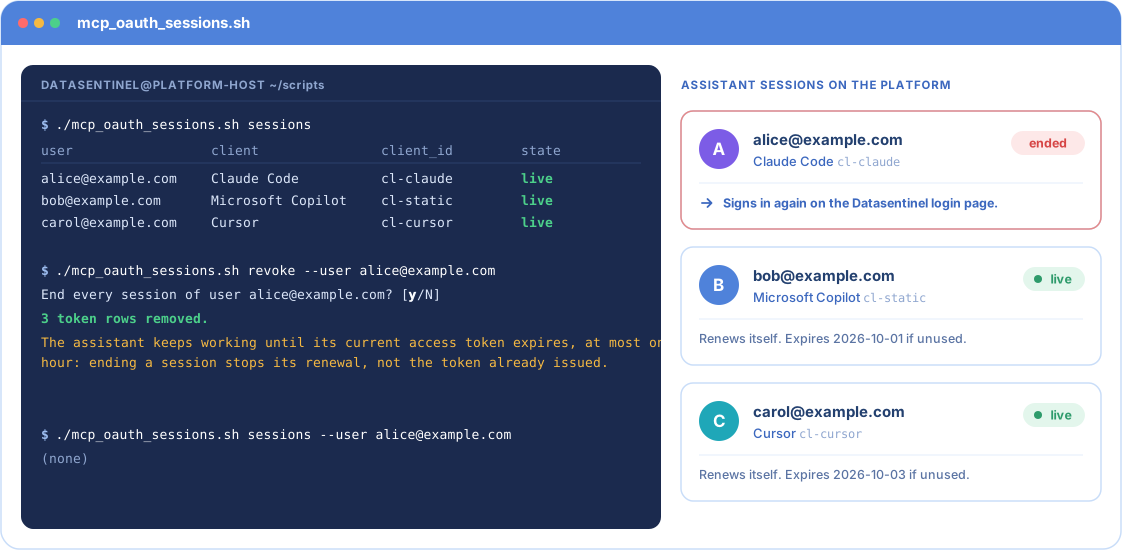
<figure><img src="https://196776047-files.gitbook.io/~/files/v0/b/gitbook-x-prod.appspot.com/o/spaces%2FDL4xMeOs1Z7fz2LBCNSv%2Fuploads%2Fgit-blob-be2a397952a0bd8f0145ca3fe6b7395fb986ddb0%2Fmanage-assistant-sessions.svg?alt=media" alt="Animated illustration with example values, in three steps, of the mcp_oauth_sessions.sh script run on the platform host. Step 1: the sessions command lists three live sessions: alice@example.com on Claude Code, bob@example.com on Microsoft Copilot and carol@example.com on Cursor. Step 2: the command revoke --user alice@example.com asks for confirmation, removes the token rows and warns that the assistant keeps working until its current access token expires, at most one hour; Alice&#x27;s session is marked ended while the two others stay live. Step 3: the sessions command for Alice returns none, and she has to sign in again on the Datasentinel login page."><figcaption><p>Listing the sessions, ending those of one user, and checking the result.</p></figcaption></figure>

The `mcp_oauth_sessions.sh` script lets an administrator see these sessions and end them. Use it to:

* check who is connected, and with which assistants;
* disconnect a user who left the company or lost access;
* retire an assistant installation that is no longer used;
* troubleshoot a sign-in that does not complete.

## Before you start

* Connect to the Datasentinel platform host.
* Run the script as the `datasentinel` user. The session store is readable by this user only.
* The script is in `/datasentinel/soft/datasentinel_backend/scripts`.

```bash
cd /datasentinel/soft/datasentinel_backend/scripts
./mcp_oauth_sessions.sh --help
```

{% hint style="info" %}
You can run the script while the MCP server is running. You do not need to stop any service.
{% endhint %}

## Commands at a glance

<table><thead><tr><th width="160">Command</th><th>What it does</th><th width="130">Changes the store</th></tr></thead><tbody><tr><td><code>summary</code></td><td>Shows the size of the session store and how many users are signed in.</td><td>No</td></tr><tr><td><code>clients</code></td><td>Lists the assistant installations registered on the platform.</td><td>No</td></tr><tr><td><code>sessions</code></td><td>Lists who is signed in, one line per user and assistant.</td><td>No</td></tr><tr><td><code>pending</code></td><td>Lists the sign-ins in progress.</td><td>No</td></tr><tr><td><code>check</code></td><td>Checks the integrity of the session store.</td><td>No</td></tr><tr><td><code>revoke</code></td><td>Ends sessions, for a user, an assistant, or both.</td><td>Yes</td></tr><tr><td><code>purge</code></td><td>Removes expired entries now.</td><td>Yes</td></tr></tbody></table>

Two options go **before** the command:

* `--json` prints JSON instead of a table, for example to feed another script.
* `--db <path>` points to another session store. The default is `oauth.db` in the directory set by `DS_MCP_OAUTH_DIR`, `/datasentinel/data/mcp_oauth` unless you changed it (see [MCP Server Setup](/manual/ai-connector/server-setup/mcp-server-setup.md#how-it-is-configured)).

```bash
./mcp_oauth_sessions.sh --json sessions
```

## See who is connected

### Overview

```bash
./mcp_oauth_sessions.sh summary
```

```
database        /datasentinel/data/mcp_oauth/oauth.db
schema version  1
oauth.db             40960 bytes
oauth.db-wal             0 bytes
oauth.db-shm             0 bytes
clients                  2 rows
refresh_tokens           2 rows
transactions             0 rows
codes                    0 rows
live sessions            2  (2 distinct users)
```

The last line is the one that matters: the number of active sessions and of distinct users.

### Assistant installations

Each assistant registers itself the first time it connects. A user with Claude Code on two laptops has two installations.

```bash
./mcp_oauth_sessions.sh clients
```

```
client_id  name               sessions  last_used         registered        permanent  redirect
---------  -----------------  --------  ----------------  ----------------  ---------  --------------------------------
cl-claude  Claude Code        1         2026-09-22 09:48  2026-09-22 09:48             http://localhost:52765/callback
cl-static  Microsoft Copilot  1         2026-09-14 09:48  2026-09-14 09:48  yes        https://copilot.microsoft.com/cb
```

* `client_id` identifies the installation. You need it to end its sessions.
* `sessions` is the number of users currently signed in through it.
* `permanent` marks an installation created by an administrator, such as Microsoft Copilot. The platform never removes it automatically.

An installation with no session that has not been used for 90 days is removed automatically.

### Signed-in users

```bash
./mcp_oauth_sessions.sh sessions
```

```
user               client             client_id  signed_in         expires           state
-----------------  -----------------  ---------  ----------------  ----------------  -----
alice@example.com  Claude Code        cl-claude  2026-09-23 09:38  2026-10-02 09:48  live
bob@example.com    Microsoft Copilot  cl-static  2026-09-23 08:48  2026-10-01 09:48  live
```

To see one user only:

```bash
./mcp_oauth_sessions.sh sessions --user alice@example.com
```

The `expires` column moves forward each time the assistant renews the session. A session that is not used for 10 days expires, and the user signs in again.

Add `--all` to also see the previous tokens of each session. They are marked `rotated` or `expired` and grant no access. The platform keeps them for a while to detect a stolen token.

### Sign-ins in progress

Use this command while a user tries to sign in and reports a problem.

```bash
./mcp_oauth_sessions.sh pending
```

```
kind              client_id   user              expires_in_s
----------------  ----------  ----------------  ------------
login page open   cl-claude   -                 518
code to exchange  cl-copilot  bob@example.com   228
```

* `login page open`: the login page was displayed, but the user has not submitted it yet. If the line stays until it expires, the user never completed the form.
* `code to exchange`: the user signed in successfully, but the assistant has not collected its session yet. If the line stays until it expires, the assistant could not receive the redirect. Check the assistant side, not the platform.

Both lists are normally empty. An entry lasts 10 minutes at most. For the messages users see during a failed sign-in, see [Sign-in problems](/manual/ai-connector/troubleshooting/sign-in-problems.md).

## End sessions

Ending a session stops its renewal. The user must sign in again on the Datasentinel login page.

{% hint style="warning" %}
**Access does not stop immediately.** The assistant keeps the access token it already holds, and that token stays valid until it expires, **at most one hour later**.
{% endhint %}

The script asks for confirmation before any change. Add `--yes` to skip the question, for example in a script. Without a terminal and without `--yes`, the script refuses to change anything.

{% tabs %}
{% tab title="A user, everywhere" %}
Disconnect a user from every assistant:

```bash
./mcp_oauth_sessions.sh revoke --user alice@example.com
```

```
End every session of user alice@example.com? [y/N] y
3 token rows removed.
The assistant keeps working until its current access token expires, at most one hour: ending a session stops its renewal, not the token already issued.
```

To prevent the user from signing in again, also remove or disable the user in Datasentinel.
{% endtab %}

{% tab title="A user, on one assistant" %}
Disconnect a user from one assistant installation only:

```bash
./mcp_oauth_sessions.sh revoke --user alice@example.com --client cl-claude
```

The user's sessions on other assistants are not affected.
{% endtab %}

{% tab title="Everyone on one installation" %}
Disconnect every user from one assistant installation:

```bash
./mcp_oauth_sessions.sh revoke --client cl-claude
```

The installation stays registered. Users can sign in again from it.
{% endtab %}

{% tab title="Retire an installation" %}
End all the sessions of an installation and delete its registration:

```bash
./mcp_oauth_sessions.sh revoke --client cl-claude --delete-client
```

An assistant that registers itself, such as Claude Code or Cursor, registers again the next time someone uses it. An installation created by an administrator, such as Microsoft Copilot, must be created again by hand.
{% endtab %}
{% endtabs %}

## Maintenance

### Remove expired entries now

The platform cleans expired entries by itself, but only when a user signs in, at most every 10 minutes. On a quiet platform where assistants only renew their sessions, nobody signs in, and this cleanup can go a long time without running. The `purge` command runs the same cleanup immediately, with the same thresholds. It asks for no confirmation.

```bash
./mcp_oauth_sessions.sh purge
```

```
transactions=0  codes=0  refresh_tokens=3  clients=0
```

The output gives the number of entries removed, per type:

<table><thead><tr><th width="190">Type</th><th>Entries removed</th></tr></thead><tbody><tr><td><code>transactions</code></td><td>Login pages opened and never submitted, older than 10 minutes.</td></tr><tr><td><code>codes</code></td><td>Sign-ins completed but never collected by the assistant, older than 5 minutes.</td></tr><tr><td><code>refresh_tokens</code></td><td>Sessions not renewed for 10 days, and old tokens of renewed sessions once they expire.</td></tr><tr><td><code>clients</code></td><td>Assistant installations unused for 90 days, with no session left and not marked <code>permanent</code>.</td></tr></tbody></table>

Sessions are removed before installations. An installation whose last session is removed can therefore be deleted in the same run.

The purge also compacts the store. It moves pending changes into `oauth.db` and resets the `oauth.db-wal` file to zero bytes.

What the purge does not do:

* It ends no active session. It removes only expired entries, and an expired entry grants no access.
* It does not affect the access tokens assistants already hold. Those are not stored on the platform.
* It is never required. It only frees space.

### Check the session store

```bash
./mcp_oauth_sessions.sh check
```

```
integrity_check  ok
user_version     1
journal_mode     wal
page_size        4096
auto_vacuum      0
```

The first line must read `ok`. The command exits with code 1 otherwise.

{% hint style="danger" %}
**If the store is damaged**, stop the MCP server, delete the files `oauth.db`, `oauth.db-wal` and `oauth.db-shm` in `/datasentinel/data/mcp_oauth`, then start the server again. No monitoring data is lost. Every user signs in again, and assistants register again by themselves. Installations created by an administrator, such as Microsoft Copilot, must be created again.
{% endhint %}

## Good to know

* The script never creates the session store. If the MCP server has never started, every command stops with `No OAuth store at ...`.
* The script does not write to the MCP server log. A revocation is visible only in the shell history of the host.


---

# Agent Instructions
This documentation is published with GitBook. GitBook is the documentation platform designed so that both humans and AI agents can read, navigate, and reason over technical content effectively. Learn more at gitbook.com.

## Querying This Documentation
If you need additional information that is not directly available in this page, you can query the documentation by asking a question.

Perform an HTTP GET request on the following URL with the `ask` and `goal` query parameters:

```
GET https://docs.datasentinel.io/manual/ai-connector/server-setup/manage-assistant-sessions.md?ask=<question>&goal=<user_goal>
```

`ask` is the immediate question: it should be specific, self-contained, and written in natural language.
`goal` is what the user is ultimately trying to achieve, the reason they need the answer. Sharing it helps GitBook give you a better, more relevant answer. A goal is most helpful when it describes the outcome the user wants rather than restating the question. For example, with `ask=how do I create an API token`, a goal like `automate deployments from our CI pipeline` lets GitBook tailor the answer to that use case.

The response will contain a direct answer to the question and relevant excerpts and sources from the documentation.

Use this mechanism when the answer is not explicitly present in the current page, you need clarification or additional context, or you want to retrieve related documentation sections.
