> For the complete documentation index, see [llms.txt](https://docs.datasentinel.io/manual/llms.txt). Markdown versions of documentation pages are available by appending `.md` to page URLs; this page is available as [Markdown](https://docs.datasentinel.io/manual/changelog/2022.md).
# 2022
Datasentinel releases from 2022.
{% updates format="full" %}
{% update date="2022-11-13" tags="feature,improvement,fix,changes,fixes" %}
## V2022.11
#### Alerting
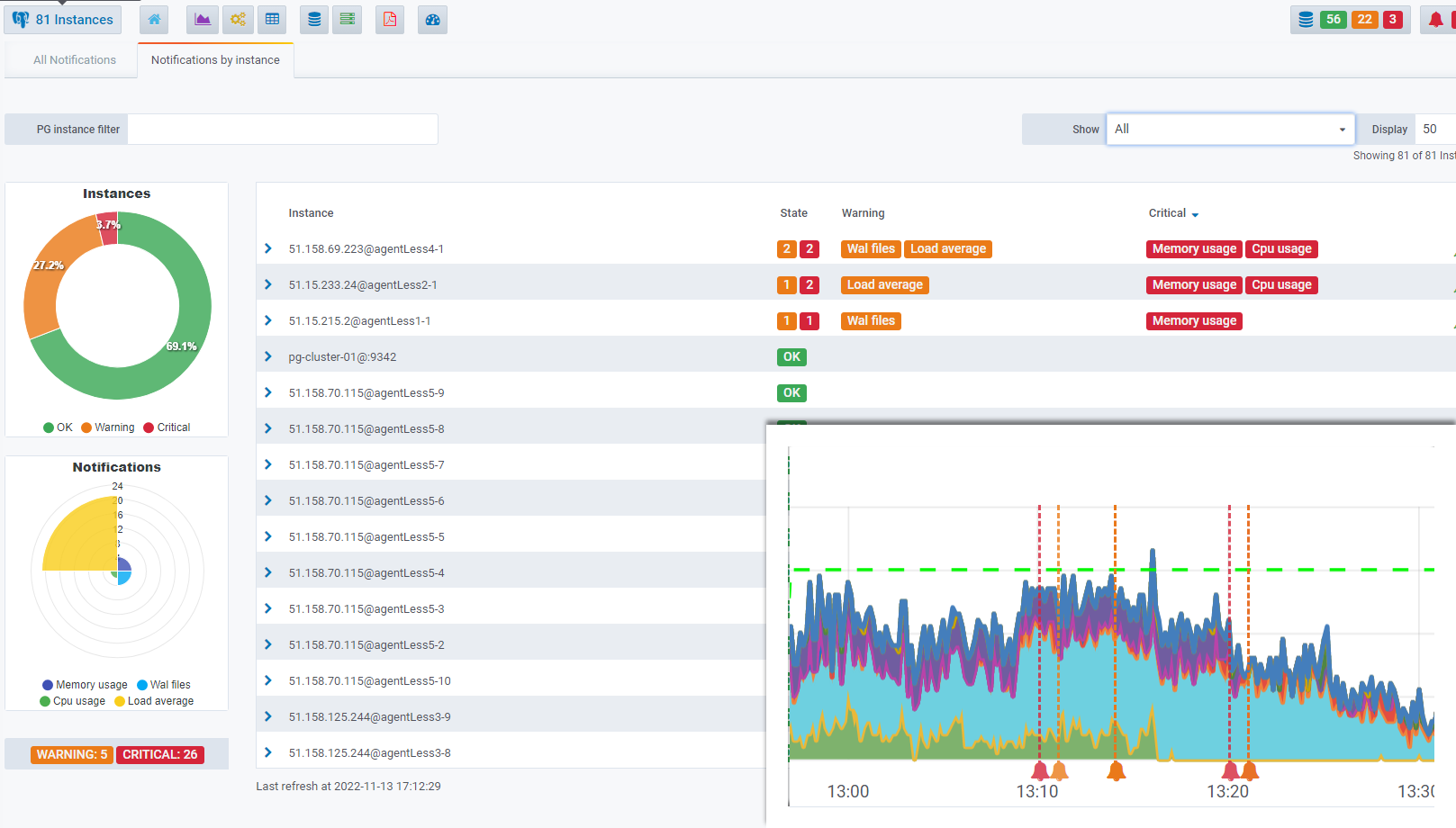
> **Alerting** is a new feature in this version, enabling seamless monitoring of your PostgreSQL clusters and providing instant notifications for any detected issues.
>
> Refer the[ Alerting documentation](/manual/features/key-features/alerting.md) on how to configure and manage alerts.\
> \
> You also have the capability to generate custom alerts using the [Alerting API](/manual/implementation/platform-usage/api-reference/alerting.md).
{% content-ref url="/spaces/lcWi6G1jtNuyGT9C0pkc/pages/JzCAjzTDOHR7uBAaPAWx" %}
[Alerting](/manual/features/key-features/alerting.md)
{% endcontent-ref %}
{% hint style="info" %}
To take advantage of alerting capabilities, ensure your agents are updated to at least version 3.0 or higher
{% endhint %}
#### WAL activity
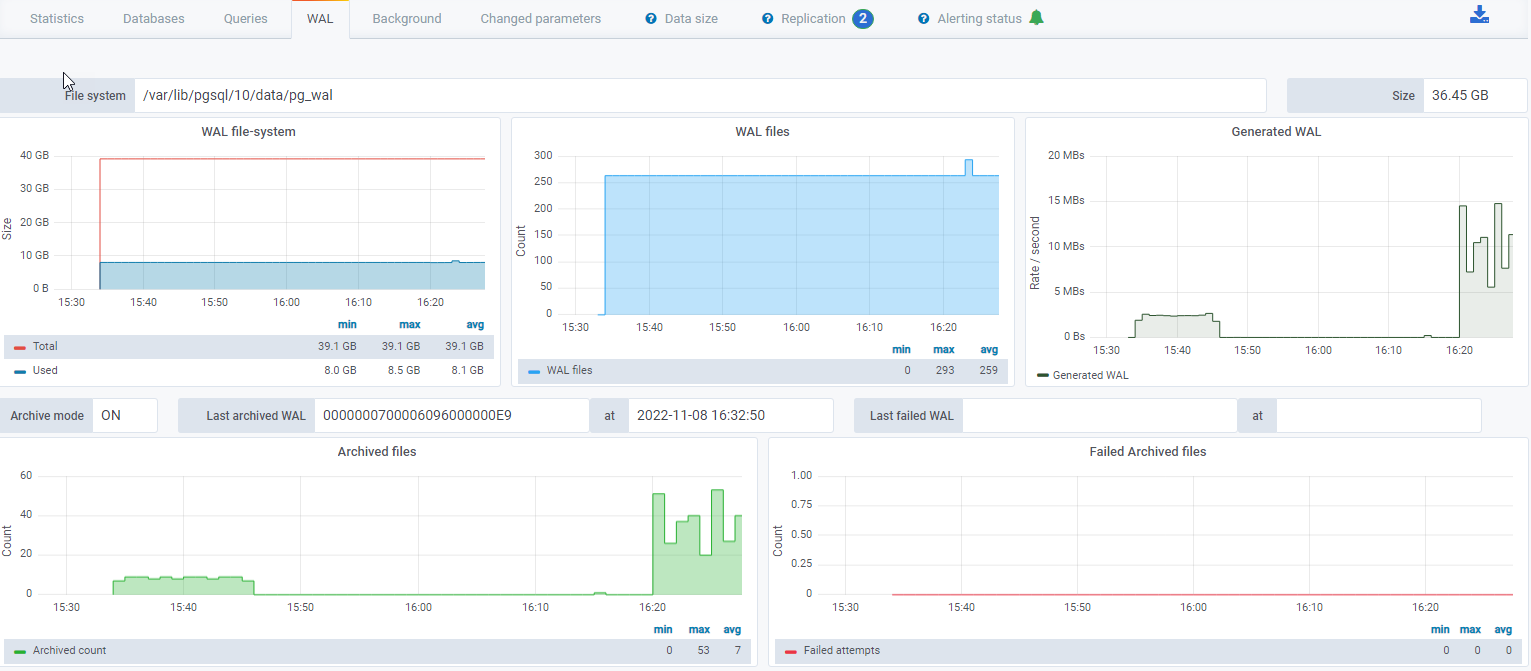
> A new dashboard displaying the **WAL and Archiving activity** for an instance has been added.\
> \
> [Real-time illustration ▶️](https://demo.datasentinel.io/d/lqjpcRnVz/pg-instance-wal?orgId=2\&from=now-1h\&to=now\&var-Filter=pg_instance%7C%3D%7Cpg-sales-3928@:9342)
#### Replication
> The number of physical replications is now displayed as a badge in the instance statistics dashboard.
#### PostgreSQL 15
> Support for [PostgreSQL 15](https://www.postgresql.org/docs/15/index.html)
#### Fixes
* Minor bugs fixed
{% hint style="info" %}
Since this version, logging **nginx** access and **influxdb** queries are disabled by default on a fresh installation.
Refer to the [FAQ](/manual/getting-started/faqs/platform-faq.md)[,](/manual/getting-started/faqs/platform-faq.md) to configure logging generated by **nginx** and **influxdb**
{% endhint %}
{% endupdate %}
{% update date="2022-07-19" tags="feature,changes" %}
## V2022.07
#### Audit
> User action auditing mechanism.
{% content-ref url="/spaces/lcWi6G1jtNuyGT9C0pkc/pages/kOlK1zlJcfHuOCJzzIhT" %}
[Audit](/manual/implementation/platform-usage/configuration/audit.md)
{% endcontent-ref %}
{% endupdate %}
{% update date="2022-06-20" tags="feature,fix,changes,fixes" %}
## V2022.06
#### Top Queries
> A flag **per execution** option has been introduced in the [Top Queries](/manual/features/key-features/top-queries.md) module, enabling you to calculate metrics on a per-execution basis.\
> \
> For instance, you can display queries that incur the highest disk reads for each execution.
#### Fixes
* Retrieval of query execution statistics improved
{% endupdate %}
{% update date="2022-06-01" tags="feature,improvement,changes" %}
## V2022.05
#### Session History
> The **session workload** module has been renamed to [Session History](/manual/features/key-features/session-history.md) for clarity
#### Cascading Replication
> Datasentinel now makes it possible to monitor all the clusters (primary, replicas) of a cascading PostgreSQL replication.
{% hint style="info" %}
To take advantage of lock explorer capabilities, ensure your agents are updated to at least version 2.9.5 or higher
{% endhint %}
{% endupdate %}
{% update date="2022-05-05" tags="feature,improvement,fix,changes,fixes" %}
## V2022.04
#### System Metrics
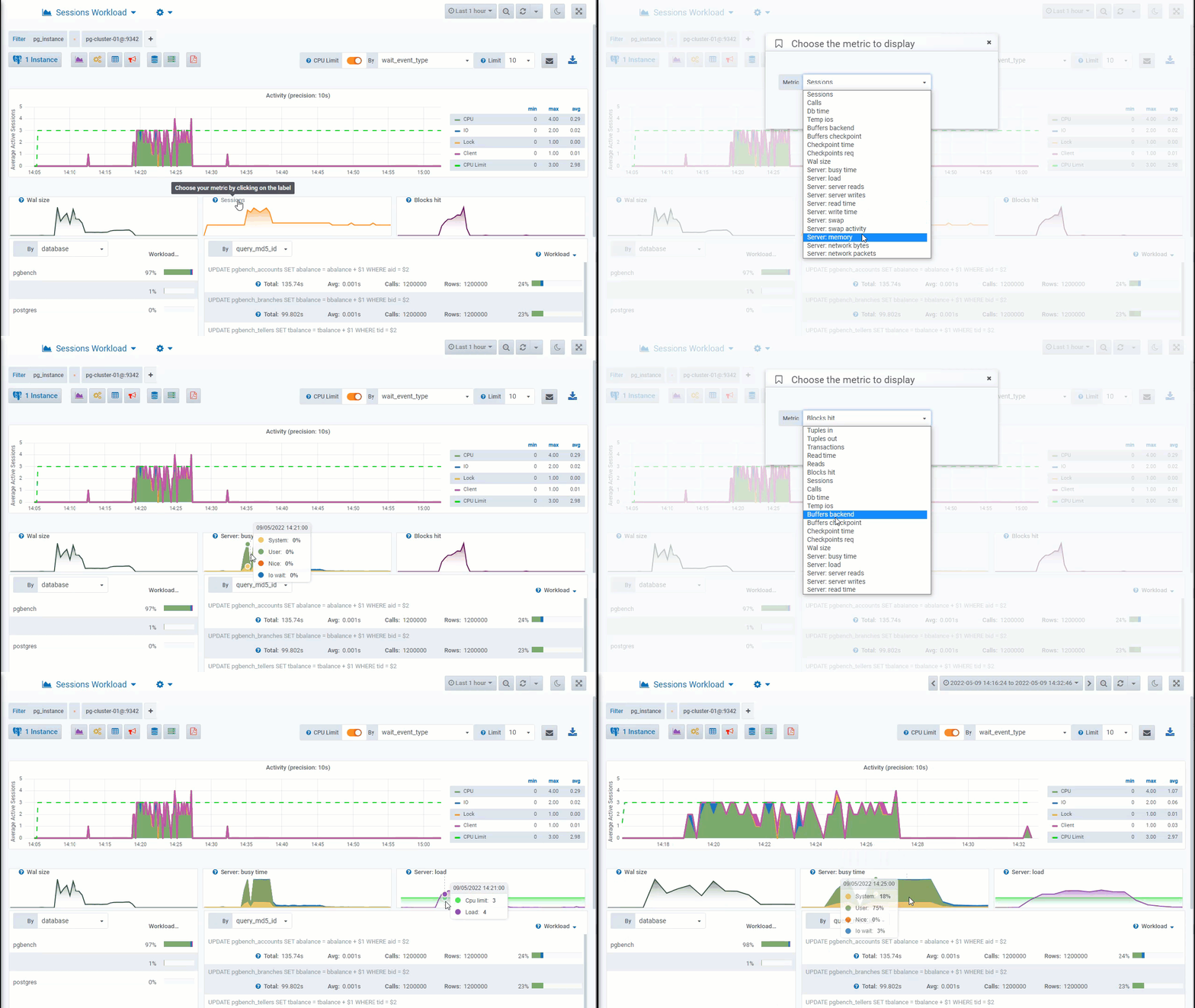
> In addition to the existing PostgreSQL metrics, the 3 small graphs on the [Session History](/manual/features/key-features/session-history.md), [Top Queries](/manual/features/key-features/top-queries.md), [Top Tables](/manual/features/key-features/top-tables.md) dashboards now have the capability to display certain system metrics.
{% hint style="info" %}
Correlating system activity with PostgreSQL activity becomes even easier and more efficient
{% endhint %}
Available metrics:
* Server: busy time
* Server: load
* Server: server reads
* Server: server writes
* Server: read time
* Server: write time
* Server: swap
* Server: swap activity
* Server: memory
* Server: network bytes
* Server: network packets
System Metrics
#### Execution Plans
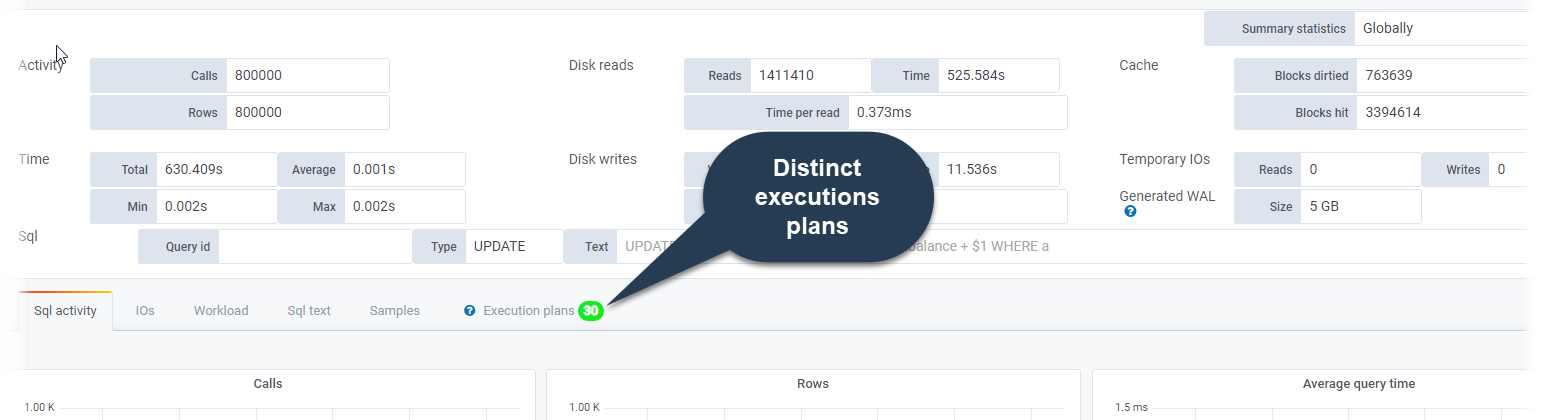
> The number of distinct execution plans is now displayed as a badge allowing you to quickly see if multiple plans exist for a query (requires [pg\_store\_plans](/manual/getting-started/postgresql-clusters/extensions/pg_store_plans.md) extension)
Execution Plans
#### Fixes
* Better fluidity of navigation on the graphical interface
{% endupdate %}
{% update date="2022-03-31" tags="fix,changes,fixes" %}
## V2022.03
#### Fixes
* Stopping the backend service now kills any remaining process
* The scheduler now works in local time and not in utc time
* The platform and the agent are compatible with the latest version of pg\_store\_plans (1.6.1)
{% endupdate %}
{% update date="2022-03-07" tags="feature,changes" %}
## V2022.02
#### Reporting
> Customize and generate a report in a few clicks.
>
> Can include one or multiple instances.
>
> Ability to filter the report on a particular database.
>
> Schedule your daily or weekly reports at the chosen date and time with sending to a mailing list.
>
> Reports can be generated in an automation flow thanks to the [Reporting API](about:blank/API/reporting-api.html#reporting-api).
>
> Multiple types of predefined reports.
{% content-ref url="/spaces/lcWi6G1jtNuyGT9C0pkc/pages/YH3ebvTtm0lvj5P9FGIg" %}
[Reporting](/manual/features/key-features/reporting.md)
{% endcontent-ref %}
{% endupdate %}
{% update date="2022-01-31" tags="fix,changes,fixes" %}
## V2022.01
#### Fixes
* Performance improvements on the homepage
* Better handling when an influxdb problem occurs. (Agent detection)
{% endupdate %}
{% endupdates %}
---
# Agent Instructions
This documentation is published with GitBook. GitBook is the documentation platform designed so that both humans and AI agents can read, navigate, and reason over technical content effectively. Learn more at gitbook.com.
## Querying This Documentation
If you need additional information that is not directly available in this page, you can query the documentation by asking a question.
Perform an HTTP GET request on the following URL with the `ask` and `goal` query parameters:
```
GET https://docs.datasentinel.io/manual/changelog/2022.md?ask=&goal=
```
`ask` is the immediate question: it should be specific, self-contained, and written in natural language.
`goal` is what the user is ultimately trying to achieve, the reason they need the answer. Sharing it helps GitBook give you a better, more relevant answer. A goal is most helpful when it describes the outcome the user wants rather than restating the question. For example, with `ask=how do I create an API token`, a goal like `automate deployments from our CI pipeline` lets GitBook tailor the answer to that use case.
The response will contain a direct answer to the question and relevant excerpts and sources from the documentation.
Use this mechanism when the answer is not explicitly present in the current page, you need clarification or additional context, or you want to retrieve related documentation sections.